
Table of Contents
- Same scam, three delivery methods
- Phishing vs smishing vs vishing at a glance
- Phishing (email): easier to catch if you slow down
- Smishing (SMS): why the small screen works against you
- Vishing (phone): why a live voice is hardest to resist
- Quishing: the emerging fourth channel
- The part most guides skip: the channel is not the point
- The one response that works on every channel
- Frequently asked questions
Phishing, smishing, and vishing are the same scam delivered through three different channels. Phishing arrives by email, smishing arrives by text message (SMS), and vishing arrives by phone call or voicemail. The names change with the channel, but the machinery underneath is identical: a stranger poses as someone you trust, then manufactures urgency so you act before you think. That single tell, an unexpected message pressuring you to move money, share a code, or click right now, is the giveaway all three share. Learn that lever and the label stops mattering.
Below we break down how each channel works, why some are harder to resist than others, and the one response that neutralizes all of them.
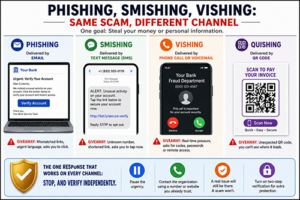
Same scam, three delivery methods
Picture one message: “Your account has been locked. Verify now to restore access.” That exact hook can reach you in three ways.
- As an email with a bank logo and a “Verify Account” button (phishing).
- As a text reading “ALERT: unusual activity. Tap to secure: [link]” (smishing).
- As a phone call from a calm “fraud department” agent who needs to “confirm your identity” (vishing).
Same lie, same goal: get your login, your card number, or a one-time passcode. Only the delivery truck changed. That is why treating these as three separate threats to memorize is a losing game. It is one threat wearing three uniforms.
Phishing vs smishing vs vishing at a glance
| Channel | How it arrives | Typical hook | The giveaway | Your defense |
|---|---|---|---|---|
| Phishing | Email with links or attachments | “Verify your account,” fake invoice, password reset | Mismatched or look-alike links; pressure to click a button | Slow down; open a new tab and log in the normal way instead of clicking |
| Smishing | Text message (SMS) or chat app | “Package delivery issue,” “fraud alert,” fake unpaid toll | Unknown number; shortened link; asks you to tap immediately | Do not tap the link; contact the company through a number you already trust |
| Vishing | Phone call or voicemail | “Fraud department,” “IRS,” “tech support” needing to confirm details | Real-time pressure; asks for codes, passwords, or remote access | Hang up; call the number on the back of your card or the official site |
| Quishing (emerging) | QR code in an email, flyer, or letter | “Scan to pay,” “scan to reset,” unexpected package insert | You cannot see where the code leads until it is too late | Do not scan codes from unsolicited sources; type the address yourself |
That table is the whole comparison in one screen. The sections below explain why each channel behaves the way it does, because understanding the mechanism is what makes the tells stick.
Phishing (email): easier to catch if you slow down
Email is the original channel, and in one way it is the most forgiving. You are usually at a keyboard, not walking down the street, so you have time and screen space to inspect the message before acting.
The classic phishing signals still hold. Generic greetings (“Dear Customer”), urgent or threatening language, and attachments you did not expect are all worth pausing on. On a computer you can hover your cursor over a link to preview the real destination before clicking, and a link that claims to be your bank but points somewhere unrelated is a clear red flag.
The trap is that these tells only help if you actually slow down. Phishing works on autopilot: you see a familiar logo, you feel a jolt of worry, you click. The defense is not a checklist you race through. It is the habit of never acting from the email itself. If a message says there is a problem with your account, close it, open a new browser tab, and log in the way you always do. A real problem will still be waiting for you there. A fake one will not exist.
Smishing (SMS): why the small screen works against you
Text-message scams are effective for reasons that have nothing to do with how convincing the wording is. They exploit the format itself.
You read texts on a small screen, often while distracted, walking, or half-paying-attention. Links are shortened, so you cannot see the real destination the way you can on a desktop. And texts feel personal and immediate in a way email does not, which nudges you to reply fast. The U.S. Federal Trade Commission has cited a study finding text open rates as high as 98 percent, far above email. High open rates plus a small, distracted screen is exactly why this channel converts.
The scale is real. The FTC reported that in 2024 consumers lost a total of $470 million to scams that started with text messages, and that the single most commonly reported type was a fake package-delivery alert, followed by phony “fraud alert” messages pretending to be from your bank. (Figures as reported by the FTC in April 2025.)
The defense mirrors phishing but is stricter, because you cannot inspect a link as easily on a phone: do not tap links in unexpected texts at all. If a text claims to be your bank or a delivery service, reach the company through a number or app you already trust, never through the contact details in the message.
Vishing (phone): why a live voice is hardest to resist
Vishing is the hardest of the three to resist, and the reason is human, not technical. A live voice creates real-time social pressure that an email or text cannot. There is no hover-to-preview, no time to think, and a polite, confident person on the line is hard to hang up on.
Scammers lean into this. They impersonate a bank’s fraud department, a government agency, or tech support, and they often spoof the caller ID so your phone displays a real-looking name or number. The U.S. Federal Communications Commission describes spoofing as deliberately falsifying the information sent to your caller ID to disguise identity, which means the number on your screen is not proof of anything.
The core mechanism to remember: a legitimate institution will never need you to read back a one-time passcode, give a full password, or install remote-access software so they can “help.” Those requests exist only to hand control to the caller. The defense is to end the call, then dial the number printed on the back of your card or on the company’s official website, and ask if anyone actually needs to reach you.
Quishing: the emerging fourth channel
A newer variant is worth naming: quishing, or QR-code phishing. Instead of a clickable link, the scam hides the destination inside a QR code placed in an email, a flyer, a parking sign, or even an insert in an unexpected package. You cannot read a QR code with your eyes, so you have no way to preview where it leads before you scan.
This is not hypothetical. In early 2026 the FBI’s Internet Crime Complaint Center published an advisory describing QR-code phishing campaigns, and the FTC has separately warned about unexpected packages containing QR codes that lead to scam sites. The takeaway is simple: treat an unsolicited QR code exactly like an unsolicited link. If you did not go looking for it, do not scan it, and reach the organization by typing its address yourself.
The part most guides skip: the channel is not the point
Most articles stop at “here are the three words, here are the definitions.” The more useful truth is that the channel barely matters. Phishing, smishing, vishing, and quishing all pull the same lever: they impersonate someone you trust and add urgency so you skip the step where you verify. Trust plus urgency is the entire attack. Learn to feel that combination and you do not need to correctly label the channel in the moment.
This also explains why the most common advice, “just check the sender address,” is not enough on its own. Attackers spoof. As the FCC notes for phone calls and as email-security guidance has long acknowledged for the “From” line, the displayed sender can be forged. A caller ID reading “Your Bank” or an email that appears to come from a real address is not verification. It is the display, and the display is one of the easiest things to fake. Relying on it is like checking a stranger’s word for who they are.
Verification means going around the message, not inspecting it. You confirm through a channel you chose and already trust: the number on your card, the app you installed yourself, the website address you typed. That habit works regardless of which uniform the scam is wearing. For how this plays out with a specific, common example, see our companion guide on bank impersonation scams.
The one response that works on every channel
Across all four channels, one response neutralizes the attack: stop, and verify independently.
That means you never use the contact details inside the suspicious message. You pause the urgency, then reach the organization through a route you already control. If it is your bank, call the number on your card. If it is a delivery service, open the app you installed. If it is your email provider, type the web address yourself. A genuine issue survives that pause. A scam falls apart the moment you step outside its script.
A second layer helps for the cases where a login does slip through: turning on two-factor authentication means a stolen password alone is often not enough to get in. We cover how that works, and its limits, in two-factor authentication for banking. And if you believe you have already engaged with one of these scams, our guide on where to report financial fraud walks through the authorities to contact.
For the full framework these channel-specific tactics fit into, start with our pillar guide on how to protect yourself from financial fraud online.
Frequently asked questions
What is the difference between phishing, smishing, and vishing?
They are the same type of scam sent through different channels. Phishing comes by email, smishing comes by text message, and vishing comes by phone call or voicemail. All three impersonate a trusted organization and use urgency to get you to share information or money before you verify.
Which is the most dangerous?
None is inherently worse, but vishing is often the hardest to resist because a live human voice creates real-time pressure and leaves no time to inspect the message. Smishing succeeds through sheer volume and high open rates on small, distracting screens.
What is quishing?
Quishing is QR-code phishing. The scam hides its destination inside a QR code, so you cannot preview where it leads before scanning. Treat an unexpected QR code the same way you would an unexpected link: do not scan it, and reach the organization by typing its address yourself.
Is checking the sender’s email address or caller ID enough to stay safe?
No. Both email addresses and caller ID can be spoofed, meaning the display can be forged to look legitimate. The reliable check is to contact the organization through a number or website you already trust, not the details in the message.
What should I do if I clicked a link or answered one of these messages?
Stop engaging, change any password you may have entered, and contact your bank or provider through an official channel. If money or personal data was involved, see our guide on where to report financial fraud for the relevant authorities.
FinMateMastery publishes educational information, not personalized financial or security advice, and is not affiliated with any bank or agency named for illustration. Please read our disclaimer.
